What Is Inventory Sync, and Why Does Overselling Happen?

Er Cai Fang
Senior Product Manager
Inventory sync keeps stock matched across Shopee, Lazada, TikTok Shop and Shopify. See why overselling happens and how Singapore sellers prevent it.
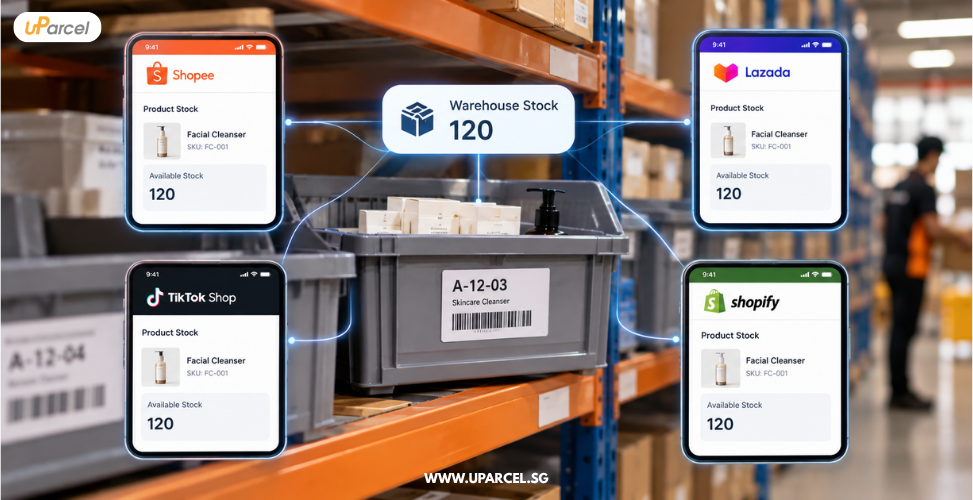
Inventory sync keeps one accurate stock count and pushes it to every channel you sell on, so Shopee, Lazada, TikTok Shop and Shopify all show the same available quantity. Overselling happens when that count falls out of step and two channels sell the same last units before either learns the stock is gone.
It is a few minutes past midnight on 11.11. Your best-selling serum has 20 units on the shelf, and orders land on Shopee, TikTok Shop and Lazada at the same moment. By the time the stock figures catch up, you have sold 23.
That gap of three units turns into cancellations, unhappy buyers and penalty points on marketplace scorecards. This guide explains what inventory sync is, why overselling happens, how marketplaces in Singapore treat stockout cancellations, and what sellers can do before the next campaign.

What is inventory sync in ecommerce?
Inventory sync means every sales channel reads its available stock from one source of truth, usually a warehouse management system (WMS) or an order management system (OMS). When a unit sells, is reserved, is returned or is received, that one record changes first, and the new available figure is pushed out to every marketplace and webstore.
Without sync, each channel keeps its own stock number, updated by hand or spreadsheet. Every manual update is a chance for the numbers to drift. These are the terms that matter:
|
Term |
What it means |
Why it matters for sync |
|
On-hand stock |
Units physically in the warehouse |
Wrong counts here break everything downstream |
|
Reserved stock |
Units tied to orders that are paid but not yet shipped |
Must be deducted before you publish availability |
|
Available stock |
On-hand minus reserved minus any buffer |
The figure each channel should show |
|
Buffer (safety stock) |
Units held back from listings on purpose |
Absorbs sync delays during order spikes |
|
SKU mapping |
Linking each channel listing and variant to one internal SKU |
A missing map means a sale never deducts stock |
|
Sync interval |
How often stock is pushed to channels |
The longer the gap, the bigger the overselling window |
For a wider look at the systems involved, see our guide to ecommerce enabler support for multichannel selling.
Why does overselling happen when you sell on several channels?
Overselling happens because stock updates are never perfectly instant. Each channel takes orders on its own, and if two channels sell the same unit before the shared count is updated, both orders go through. Manual updates, slow sync intervals, poor SKU mapping and inaccurate warehouse counts all widen that gap.
The most common causes in Singapore multichannel stores are:
- Sync delay. If stock is pushed every 15 or 30 minutes, every channel keeps selling from the old number until the next push.
- Campaign concurrency. Flash deals on 11.11, 12.12 and payday sales compress hours of orders into minutes, so even short delays matter.
- Manual or spreadsheet updates. One person updating four seller centres cannot keep pace with live orders.
- Bundles and variants. A gift set that uses one unit of a serum must deduct that serum. If the bundle is not mapped to its components, the serum oversells.
- Inaccurate on-hand counts. If the warehouse system says 20 but the shelf holds 17, perfect sync still pushes a wrong figure.
- Channel settings. On Shopify, "Continue selling when out of stock" allows orders after stock reaches zero.
What happens to your shop when you oversell on Shopee, Lazada or TikTok Shop?
When you oversell, you have to cancel orders you cannot ship. Shopee, Lazada and TikTok Shop each treat stockout cancellations by the seller as the seller's fault, and they feed into shop health metrics that can lead to penalty points, order limits or reduced visibility.
Here is how the three main marketplaces in Singapore track it, based on their seller education pages.
|
Marketplace |
Metric affected |
What the platform says |
|
Shopee Singapore |
Non-Fulfilment Rate (NFR) |
Orders the seller cancels because a product is out of stock count toward NFR. NFR covers the past 7 days, is reviewed weekly, and penalty points start at an NFR of 10%. Shopee encourages sellers to keep NFR below 5%. |
|
TikTok Shop Singapore |
Seller-Fault Cancellation Rate (SFCR) |
Seller-initiated cancellations such as stockouts count toward SFCR. The target is below 2.5%, and a high SFCR can lead to Account Health Rating point deductions and order volume limits. |
|
Lazada Singapore |
Seller cancellation rate |
Lazada tracks seller cancellations, and its seller policy warns that high cancellation rates can lead to order caps or listing deactivation. Check Lazada Seller Center for current thresholds. |
The rules change from time to time, so check the Account Health or Shop Health page in each seller centre. Shopee's own fulfilment policy page and TikTok Shop's Seller-Fault Cancellation Rate guide are the places to confirm current thresholds.
The cost goes beyond penalties: a buyer whose 11.11 order is cancelled may leave a poor rating and buy elsewhere.
How does inventory sync work, step by step?
Inventory sync works by connecting your warehouse stock record to every sales channel through APIs or integration software. Orders flow in, stock is reserved and deducted once, and the new available figure flows back out to each channel, ideally within seconds rather than minutes.
A well-run sync setup follows this sequence:
- Set one source of truth. Decide which system owns the stock count, usually the WMS at your fulfilment warehouse.
- Map every SKU. Link each Shopee, Lazada, TikTok Shop and Shopify listing, variant and bundle to one internal SKU.
- Pull orders automatically. Orders from every channel are imported into the OMS as soon as they are paid.
- Reserve and deduct. Each order reserves stock immediately, so the available figure drops before picking starts.
- Push availability to all channels. The updated available quantity, minus any buffer, is sent to every listing.
- Update on receipt and returns. New inbound stock is added after it is received and checked, and returns are added back only after inspection.
- Reconcile with cycle counts. Regular shelf counts catch drift between the system and the physical stock.
This is where the warehouse and the store connect. An omnichannel warehouse that holds one pool of stock for every channel makes step 1 far simpler than splitting stock across locations.

How do you prevent overselling before 11.11?
To prevent overselling before 11.11, confirm your on-hand counts, tighten your sync interval, set buffers on fast-moving SKUs, map every bundle, and freeze manual stock edits during the campaign. Do this two to three weeks ahead so there is time to test before the order spike.
Use this checklist in the weeks before a mega sale:
- Run a full cycle count of campaign SKUs so the starting number is right.
- Check every SKU map, including new listings and campaign bundles created for 11.11.
- Set buffers on hero products, for example holding back a few units on each SKU you expect to sell out.
- Shorten the sync interval or confirm your integration pushes stock in near real time.
- Reduce the shared pool by any units reserved for marketplace flash deals.
- Turn on low-stock alerts. Shopee, for example, offers a Low Stock Reminder so sellers can restock before items run out.
- Review out-of-stock settings on Shopify so products stop selling at zero unless you are taking pre-orders.
- Freeze manual edits during peak hours, and name one person to approve any stock change.
For the wider campaign plan, see our peak season fulfilment checklist. This week we are also publishing guides on how a partner runs campaign day for your store and how to scale pick and pack for a 5x order spike.
Should you run inventory sync yourself or outsource it?
Run inventory sync yourself if you sell on one or two channels with modest volumes and have someone who owns the stock record daily. Outsource it when you sell on three or more channels, run frequent campaigns, or keep stock in a third-party warehouse, because sync then depends on the warehouse and store teams working as one.
|
Factor |
In-house sync |
Outsourced to a marketplace partner |
|
Who owns the stock record |
Your team, often across spreadsheets and seller centres |
The partner's WMS, linked to your channels |
|
Campaign readiness |
Depends on staff availability at midnight |
Planned buffers, allocation and monitoring |
|
Link to physical stock |
Separate from the warehouse if you use a 3PL |
Same team holds the stock and updates channels |
|
Best fit |
One or two channels, low SKU count |
Three or more channels, frequent campaigns |
Many overselling problems are handover problems: the store team creates a bundle, the warehouse never hears about it, and the count is wrong from day one.
How does uParcel's CMOS handle inventory sync?
uParcel's CMOS (Complete Marketplace Outsource Solution) brings store management and fulfilment warehousing under one partner, so the team that lists your products is connected to the team that holds your stock. That shared ownership closes the handover gap where most overselling starts.
Under CMOS, your stock sits in uParcel's fulfilment warehouse in Singapore, and uParcel's API integration links your sales channels to fulfilment operations. Listing work under store management includes SKU and bundle mapping, while fulfilment warehousing covers receiving, cycle counts and returns inspection.
Before campaign days, CMOS plans buffers and campaign allocations together with order volumes. Orders are then picked, packed and dispatched with same-day dispatch capability and delivered through uParcel's island-wide network. uParcel holds a 4.9 Google rating across 9500+ reviews.
Conclusion
Inventory sync keeps one accurate stock count and shares it with every channel you sell on. Overselling happens when that count lags behind real orders, which is most likely during 11.11, 12.12 and other campaign peaks.
Stockout cancellations count against the seller on the major marketplaces. The fix is a single source of truth, clean SKU mapping, sensible buffers and a warehouse team connected to your store team.
If you are reviewing your setup before the next mega sale, uParcel's CMOS (Complete Marketplace Outsource Solution) is one way to put store management and stock under the same roof.
If you're looking to tidy up inventory sync across your marketplaces in Singapore, uParcel's team is happy to walk you through your options.
Frequently asked questions
How often should inventory sync run?
As close to real time as your integration allows, especially during campaigns. Intervals of 15 to 30 minutes may be workable on quiet days, but they leave a wide overselling window during flash sales.
Does overselling affect my Shopee seller rating?
Yes. Shopee counts orders a seller cancels because a product is out of stock toward the Non-Fulfilment Rate, and a high NFR can earn penalty points. Shopee encourages sellers to keep NFR below 5%.
How much buffer stock should I hold back on each channel?
There is no fixed rule. Base it on how fast each SKU sells and how long your sync takes, and hold larger buffers on campaign hero products that can sell out in minutes.
Can I sync stock if I use a 3PL warehouse?
Yes, as long as the 3PL's warehouse system connects to your channels through APIs or integration software. The key question is who owns SKU mapping and updates when new listings or bundles are created.
Should I give each marketplace its own stock allocation?
Splitting stock by channel avoids overselling but often leaves units unsold on one channel while another runs out. A shared pool with buffers usually sells more, with fixed allocations reserved for marketplace flash deals that require them.
Other Blog Posts
From Return to Resolution: How uParcel Manages Ecommerce Returns
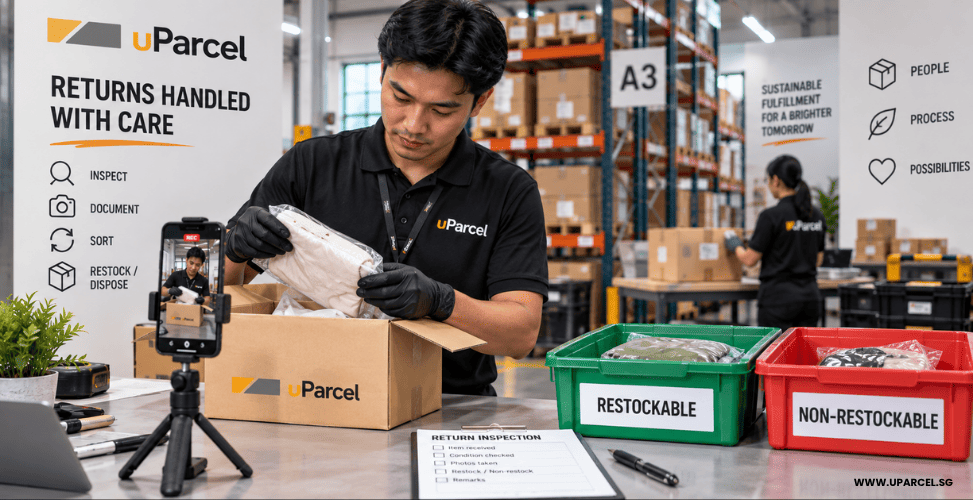
A return is not the end of a transaction, it is the moment that determines whether the customer comes back, whether the inventory is recoverable, and whether a marketplace dispute gets resolved in the seller's favour or against it. For ecommerce sellers on Shopee, Lazada, and TikTok Shop in Singapore, returns are an operational reality. Shopee's buyer protection and Lazada's return policies mean customers can initiate returns for a range of reasons, wrong item, damaged in transit, product not as described, and the burden of resolution lands squarely on the seller. Without a documented, auditable process behind every return, sellers face three compounding risks: lost inventory that was never properly assessed, disputes that cannot be defended because there is no photographic evidence, and stock levels in the system that do not reflect what is actually on the shelf. Returns management is not a back-office function. For marketplace sellers processing significant order volumes, it is a direct determinant of seller ratings, inventory accuracy, and the cost of doing business. This post explains exactly how uParcel handles every return from the moment a parcel arrives at the warehouse to the point where the item is back in active inventory, disposed of, or returned to the client. Why Returns Management Breaks Down Without a Clear Process Most returns problems are not caused by returns themselves; they are caused by the absence of a defined process for handling them. Without documented evidence of a return's condition at the point of receipt, a seller has no way to verify whether the customer returned the correct item, whether the product was damaged before or after the customer received it, or whether the packaging was tampered with before return. These distinctions matter enormously when disputing a refund on Shopee's resolution centre or Lazada's claim process. Without integration between the returns process and the inventory management system, restocked items may not be reflected in live stock counts leading to overselling, incorrect reorder decisions, and discrepancies that only surface during a physical count. And without visibility into what happened at each step, sellers end up chasing updates manually: emailing the 3PL, waiting for responses, and getting incomplete information. A well-run returns process solves all three of these problems systematically, for every return, every time. How uParcel Manages Returns: Step by Step Step 1: The Parcel's External Condition Is Documented Before Opening When a returned parcel arrives at the uParcel warehouse, the team photographs and records its external condition before opening it. This is a deliberate first step, not an administrative formality. The external condition of a returned parcel tells a story: whether the original packaging is intact, whether the box shows signs of impact or resealing, and whether the parcel appears to have been opened and repacked before being returned. Capturing this evidence before the parcel is opened creates a clean, timestamped record of exactly what the warehouse received, protecting both the seller and the fulfillment team in any subsequent dispute. For sellers dealing with cases where a customer claims they returned a product in its original condition, pre-opening documentation is often the critical piece of evidence. Step 2: The Product Condition Is Assessed and Recorded Once the external condition is documented, the parcel is opened and the product itself is assessed. The condition of the item whether it is undamaged and resaleable, damaged but salvageable, or unsuitable for resale is recorded with photos and video. This creates a two-layer record: what the packaging looked like on arrival, and what the product looked like inside. Together, these records allow sellers to establish whether damage occurred before or after the customer received the item, which directly affects whether a refund claim is the seller's liability or a courier's. The product assessment also determines the realistic options for what happens next. An item that is undamaged and in original packaging can go straight back into active inventory. An item that is damaged but has recoverable components may need the seller's input before a decision is made. An item that is clearly unsaleable can be flagged for disposal without the seller needing to physically inspect it themselves. Step 3: The Client Is Notified With Full Documentation Once the assessment is complete, the client receives an email notification containing: The order number of the original transaction The returned SKU(s) what was actually returned, confirmed against the original order Supporting photos and videos of both the parcel's external condition and the product's condition This notification gives the seller everything they need to respond to a customer dispute, confirm that the correct product was returned, and make an informed decision about how the item should be handled without needing to visit the warehouse or request the information separately. For sellers managing marketplace disputes on Shopee's Resolution Centre or Lazada's Return portal, having time stamped photographic evidence provided automatically with every return is a significant operational advantage. The documentation is ready when the dispute requires it, not scrambled for after the fact. Step 4: The Client Decides What Happens to the Item Once the client has reviewed the documentation, they determine how the returned item should be handled. uParcel supports three standard outcomes: Restock into available inventory If the product is undamaged and suitable for resale, it is returned to active stock. The inventory count in the management system is updated to reflect the restocked unit, available for the next order without any manual intervention from the seller. Disposal If the product is damaged, expired, or no longer suitable for resale, the client can authorize disposal. This keeps the warehouse free of unsaleable stock and prevents damaged items from being accidentally restocked and dispatched to the next customer. Return to the client If the client wants to inspect the item personally for a product recall assessment, a quality review, or their own records, the item can be returned to the client's own inventory or premises. Every one of these outcomes is logged in the IMS at the point of action. The client does not need to follow up to confirm what happened; the system reflects it. IMS: Real-Time Visibility Across Every Return Every action taken from return receipt through to final outcome is tracked in uParcel's Inventory Management System (IMS). This is where the returns process translates from a physical operation into a data record that sellers can act on. What clients can see in the IMS: Current stock counts updated in real time as returns are restocked, disposed of, or transferred Return status at each stage: received, assessed, pending client decision, resolved Inventory adjustments with timestamps and associated return references The practical significance of this for marketplace sellers is direct: accurate IMS data means accurate stock counts on Shopee, Lazada, and TikTok Shop. Sellers who rely on manual returns tracking or periodic reconciliation will consistently operate with stock counts that lag reality, leading to overselling and the associated penalties, or overstocking because restock items are not being counted. Real-time IMS visibility also eliminates the operational overhead of chasing return updates manually. Instead of emailing a 3PL to ask about a return that came in three days ago, the client can see exactly where it is in the process and what decision, if any, is still pending from their side. For marketplace sellers tracking fulfillment performance, returns rate and resolution time are among the key operational indicators that affect long-term profitability. The post on ecommerce fulfillment KPIs Singapore sellers should track covers how returns fit within the broader set of metrics worth monitoring. Beyond Returns: Pick-and-Pack Documentation uParcel's documentation commitment does not begin at the returns stage, it starts at the point of outbound fulfillment. Clients can request video recordings of the pick-and-pack process for any specific order. These recordings verify: That the correct SKU was picked from the correct location That the order was packed to specification, correct packaging type, protection materials, labelling That any special packing instructions for that order were followed This capability matters most in two scenarios. First, when a customer claims they received the wrong item or a damaged product, a pick-and-pack video is unambiguous evidence of what was in the parcel when it left the warehouse. Second, for sellers with specific marketplace packing requirements (Shopee-compliant packaging, branded inserts, gift wrapping for specific SKUs), the video confirms those requirements are being met at scale, not just assumed. Together with the returns documentation process, this creates a complete evidence chain: proof of what went out, and proof of what came back. What This Means for Your Marketplace Operations For sellers operating on Shopee, Lazada, and TikTok Shop, the returns process described above has direct implications for seller account health. Dispute resolution: Timestamped photographic evidence of a return's condition, available for every return, without the seller needing to request it, significantly strengthens a seller's position in marketplace dispute processes. Sellers who cannot provide evidence of what was returned and in what condition routinely lose disputes that the evidence would have won. Inventory accuracy: Returns that are documented, assessed, and either restocked or written off through a systematic process keep IMS stock counts accurate. Accurate counts prevent overselling, which is one of the most direct causes of Non-Fulfilment Rate (NFR) penalties on Shopee and similar metrics on Lazada. Customer trust: A returns process that is prompt, documented, and communicated to the customer (via the seller, once the seller has the documentation in hand) signals professionalism. Customers who receive a clear, evidenced response to a return dispute are more likely to repurchase than customers who receive a delayed, vague one. The relationship between fulfillment quality and repeat purchase is covered in more detail in the post on how fast fulfillment drives customer loyalty in Singapore. Returns Handled Right, From the First Parcel to the Last Record A returns process without documentation is a liability. A returns process with documentation, time-stamped, photo and video-supported, and integrated into a live inventory management system is a tool that protects the seller at every stage of a dispute, keeps inventory counts accurate, and removes the operational overhead of manual follow-up. uParcel's approach to returns, condition documented before opening, product assessed and recorded, client notified with full evidence, outcome tracked in the IMS, is designed to make returns manageable at any order volume, without the seller needing to be involved in every step. The pick-and-pack recording capability extends that same principle to the outbound side: evidence of what went out, so that what comes back can be assessed against a known baseline. To learn more about how uParcel's fulfillment service handles your end-to-end order operations from inbound receiving to returns resolution, visit the Ecommerce Fulfillment service page or reach out to the team to discuss your specific requirements.
Singapore's Ecommerce Boom: Is Your Fulfillment Ready for It?
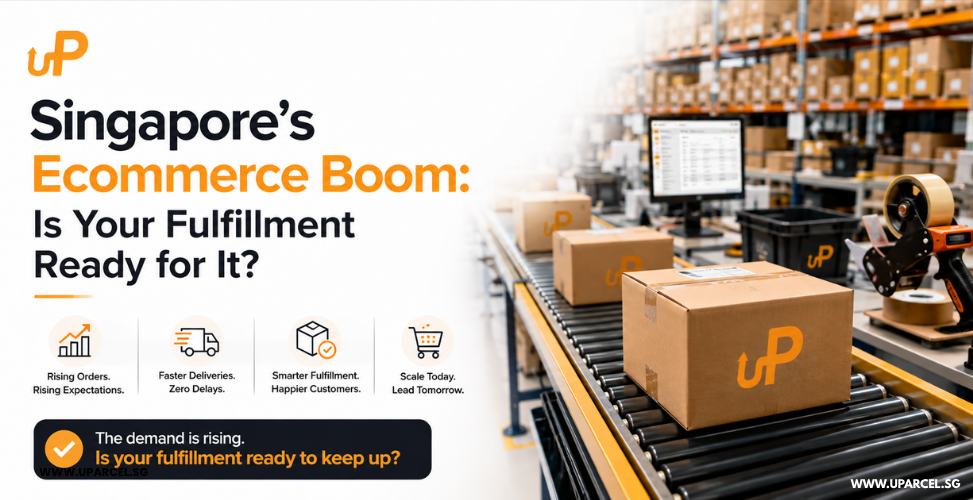
Singapore just posted the fastest shopping-app install growth in the world. According to Adjust's August 2026 data, Singapore's shopping app installs grew 67% year-on-year against a global average of just 2% for ecommerce apps overall. That is not a cyclical blip or a seasonal spike. It is structural demand growth, compressing into a market that was already one of Southeast Asia's most digitally active. More app installs. More active sessions. More buyers checking out. More orders land in seller warehouses with less notice and less margin for operational error. For Singapore's ecommerce sellers, this is genuinely good news. But good news creates a specific problem: the brands that convert this surge into revenue are not necessarily the ones with the strongest marketing, the sharpest listings, or the largest ad budgets. They are the ones whose fulfillment operations can actually keep up. What 67% Install Growth Means Operationally When shopping app installs grow at 67% year-on-year, the effect is not evenly distributed. Not every seller experiences a 67% order spike overnight. What actually happens is more nuanced and in some ways more demanding. New buyers enter the market. First-time app users are exploring, comparing, and making their first purchases. Conversion is lower, but the pool of potential buyers expands significantly. Existing buyers shop more frequently. Session data typically correlates with purchase frequency. More app opens means more purchase decisions and more repeat orders from your existing customer base. Platform algorithms respond to activity. Shopee, Lazada, and TikTok Shop weight their search and recommendation algorithms toward sellers with strong fulfillment metrics. More buyers in the market means more competition for platform visibility and sellers who maintain their Late Shipment Rate (LSR) and order accuracy hold their position while others lose ground. Order volume becomes less predictable. A 67% shift in the install base does not smooth itself into a predictable daily order increase. It creates spikes, weekend surges, flash sale effects, viral product moments that arrive without warning and test whether your fulfillment infrastructure can flex. The Five Signs Your Fulfillment Can't Keep Up With Demand Growth Most sellers do not realize their fulfillment setup has hit its ceiling until they are already past it usually during a demand spike when the cost of failure is highest. 1. Your Shopee LSR is creeping up during busy periods The Late Shipment Rate is a direct readout of whether your dispatch operations can keep pace with incoming orders. If your LSR holds steady at low volumes but rises when orders surge, your capacity ceiling is visible in your platform data. 2. You are making packing errors at higher volumes Wrong items shipped. Missing components. Incorrect quantities. These errors increase when manual fulfillment operations are stretched to more orders, the same number of hands, and more pressure per unit time. Error rates are a capacity signal. 3. You are spending more time on dispatch, less on the business Growth should free up resources as your operation becomes more efficient. If order growth is consuming proportionally more of your team's time on mechanical packing and dispatch tasks, your fulfillment model is not scaling; it is straining. 4. Your packaging materials and stock replenishment are consistently behind A fulfillment operation that keeps running out of poly mailers, carton boxes, or packing tape is an operation where supply management has not scaled with order volume. The bottleneck shows up as delays before the parcel even reaches the courier. 5. You cannot take on new channels because dispatch would break If the reason you have not listed on TikTok Shop or opened a Shopify store is that your current fulfillment cannot handle additional order streams, growth is being capped by operational capacity not by demand. Why Most Self-Managed Fulfillment Has a Hard Ceiling Self-managed fulfillment from a home, a rented unit, or a small in-house team is an efficient starting point. It gives founders direct visibility over every order and keeps costs minimal at low volume. It also has a structural ceiling that most sellers hit somewhere between 100 and 300 orders per month. The ceiling is not primarily about space. It is about time. Picking and packing 200 orders per month manually consumes approximately 15–20 hours of productive time per week. At 500 orders per month, that time commitment cannot be staffed with one person. And during a demand surge, the exact moment when operational reliability matters most for platform SLA maintenance and customer satisfaction, the self-managed model is the least resilient. A 67% market-wide growth trend is not going to peak and retreat. Singapore's digital consumer base is expanding structurally. The question for sellers is not whether demand will grow, it is whether their fulfillment is built to absorb that growth or to resist it. What a Scalable Fulfillment Setup Actually Looks Like A fulfillment operation that scales with demand growth has three characteristics that self-managed operations typically cannot replicate: Defined throughput capacity with a flex buffer A professional fulfillment partner operates with defined daily pick-and-pack capacity and a staffing model that can absorb volume spikes without affecting dispatch quality or SLA compliance. When your orders double during a Shopee 9.9 campaign, the additional volume processes through the same system at the same accuracy standard. Platform integration that removes manual SLA risk Tracking numbers are generated and pushed back to Shopee, Lazada, and TikTok Shop automatically at the point of dispatch regardless of time of day, order volume, or whether you are at a computer. LSR protection is structural, not dependent on manual attention. Inventory visibility that supports demand planning Real-time inventory tracking across all sales channels means you see stock levels decreasing in real time and can plan replenishment before stock-outs occur, not after orders start failing. During a growth surge, stock-out prevention is as important as dispatch speed. uParcel's Ecommerce Fulfillment service is built around this model, same-day dispatch from the Defu warehouse, platform integration included as standard, and a returns management process that maintains fulfillment quality as your order volume scales. The Competitive Advantage Is Operational, Not Just Marketing Singapore's 67% shopping-app install growth creates a larger addressable market. But it also creates more competition for buyer attention within that market and more competition on the platform metrics (fulfillment rate, LSR, seller score) that determine which sellers those buyers see. The sellers who convert this growth into sustained revenue will not simply be the ones who attract the most clicks. They will be the ones who fulfill every order accurately, on time, every day, including the days when demand spikes unexpectedly. That is an operations problem as much as a marketing one. And it is worth solving before the next surge, not during it. If your current fulfillment setup is approaching its ceiling, speak to uParcel's team about what a scalable fulfillment model looks like for your product range and current order volume. Source: Singapore leads global shopping-app install growth at 67% year-on-year (Adjust, August 2026), as reported by TechNode Global, 27 August 2026.
Storage Cost Isn't Fulfillment Cost: What a Self-Storage Unit Doesn't Do for Your Ecommerce Business
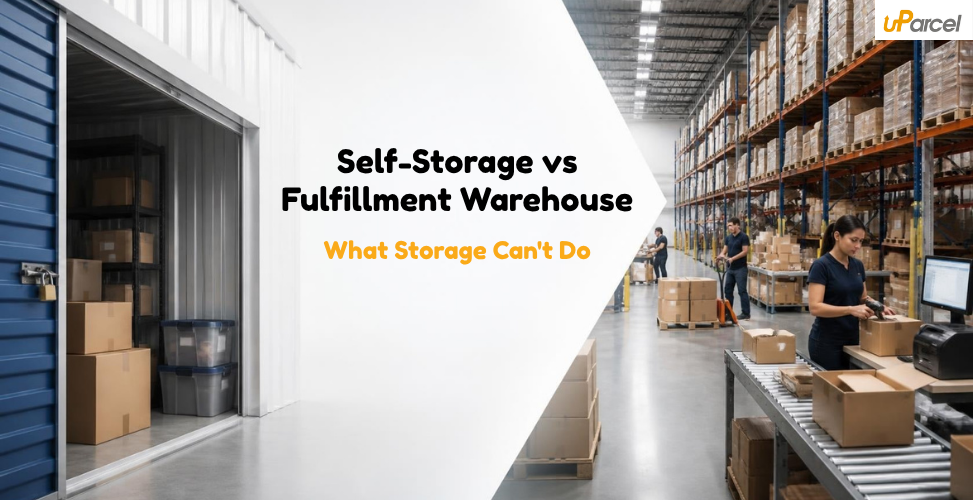
The first time most Singapore ecommerce sellers compare a self-storage unit to a fulfillment warehouse, they look at one thing: the monthly fee. Self-storage in Singapore costs S$200–600 per month for a small unit. A professional 3PL fulfillment service costs more. On paper, that looks like a straightforward case for self-storage. The problem with that comparison is that it is not comparing the same thing. A self-storage unit stores your inventory. A fulfillment warehouse stores your inventory, picks and packs every order, integrates with your sales channels, dispatches with a courier, processes your returns, and updates your stock count, automatically, every day. When you rent a self-storage unit for your ecommerce business, you are buying the cheapest possible part of the fulfillment equation. You are still doing everything else yourself. What Self-Storage Actually Is and Is Not Self-storage in Singapore is designed for one purpose: holding things in a secure, lockable space that is not your home. It serves individuals between house moves, businesses with seasonal equipment, and contractors with tools to stash between jobs. It is not an operational logistics facility. A self-storage unit gives you: A lockable room of a set size Access during facility opening hours Security and basic climate control (in some facilities) It does not give you: Shelving or racking optimized for ecommerce picking An Inventory Management System (IMS) Platform integration with Shopee, Lazada, TikTok Shop, or Shopify Staff to pick, pack, and label your orders A courier collection point Return receiving and processing Inventory accuracy tracking When you use self-storage as your fulfillment base, you are the IMS. You are the picker. You are the packing team. You are the courier liaison. You are handling returns. The storage fee is the smallest line item in your actual fulfillment cost. The Seven Things a Self-Storage Unit Cannot Do for Your Ecommerce Business 1. Pick and pack your orders Every order that comes through Shopee or Lazada needs someone to locate the item, pick it from your shelves, pack it, weigh it, label it, and prepare it for courier collection. In a self-storage unit, that someone is you, every time. 2. Integrate with your sales channels A fulfillment warehouse connected to your Shopee, Lazada, TikTok Shop, or Shopify account receives your orders automatically and pushes dispatch and tracking updates back to the platform. A self-storage unit has no system, you are manually checking orders across platforms and manually marking items shipped. 3. Meet Shopee's ships-by deadline without you physically present Shopee requires sellers to arrange shipment within the ships-by window. If you are not physically at your storage unit that day because you have a day job, you are travelling, you are unwell, your Late Shipment Rate (LSR) climbs. Above 10%, your listings get suppressed. 4. Dispatch when you cannot be there A self-storage unit operates only when you are operating it. A fulfillment warehouse operates on a schedule with a noon cut-off for same-day dispatch regardless of what you are doing. 5. Process your returns When a customer returns an item through Shopee Guarantee or Lazada's buyer protection, that item needs to be received, inspected, and either restocked or flagged as unsaleable. In a self-storage setup, it arrives at your home or a P.O.-box equivalent. You assess it. You update your inventory. You decide what to do. A fulfillment warehouse handles all of this as a defined service. 6. Track inventory in real time Most self-storage operators offer no inventory tracking. You are responsible for knowing what you have, where it is, and when you are running low. A fulfillment warehouse with an IMS gives you a live view of every SKU, every unit, and every movement in and out. 7. Scale with your order volume At 20 orders a month, self-fulfillment from a storage unit is manageable. At 100 orders a month, it starts to dominate your week. At 300 orders a month, it is a full-time job that is not your actual job. The Hidden Cost of Doing Fulfillment Yourself When sellers compare self-storage fees against fulfillment service fees, they count the storage cost. They rarely count the cost of their own time. Consider what self-fulfillment from a storage unit actually requires per week at 80 orders per month: Travel to and from the storage unit: 3–4 trips per week minimum Order processing: checking platforms, downloading pick lists, matching orders to stock Picking and packing: locating items, assembling orders, packing, sealing Labeling and sorting: printing labels or handwriting addresses, organizing for courier Courier coordination: dropping off or waiting for collection Returns handling: receiving, inspecting, restocking Inventory reconciliation: checking stock levels, reordering, updating listings At 80 orders per month, this realistically consumes 12–18 hours per week. At S$25–40 per hour of your time, that is S$1,200–2,880 per month in opportunity cost alone, before you count the storage fee, packaging materials, or transport. The question is not whether the 3PL costs more than the storage unit. The question is whether the 3PL costs more than the storage unit plus everything you are currently doing yourself. What Happens When Orders Scale Self-fulfillment from a storage unit has a ceiling, and it arrives faster than most sellers expect. At 20–30 orders per month: manageable. A few hours per week, one or two storage unit trips. At 80–100 orders per month: starting to dominate evenings and weekends. Courier collection timing starts affecting your SLA. Inventory discrepancies begin appearing. At 200+ orders per month: physically unsustainable without hiring help. At this point, you are either building an ad hoc warehouse team of your own or falling behind on dispatch which affects your Shopee LSR, Lazada NFR, and customer satisfaction scores simultaneously. The critical point is that the scaling problem arrives during the periods when it is hardest to stop and reorganize, typically during peak sales (Mega Sales, year-end, Chinese New Year). Sellers who have not migrated to a fulfillment partner before peak hit it hardest precisely when they can least afford the operational disruption. Migrating to a fulfillment partner mid-peak is operationally disruptive. Migrating before your volume demands it is straightforward. When Self-Storage Actually Makes Sense To be clear: self-storage is not the wrong choice for every ecommerce business. There are scenarios where it is genuinely the right answer. Self-storage makes sense when: You are in a testing phase, validating product-market fit before committing to operational infrastructure Your order volume is below 20–30 per month and likely to stay there You have significant time flexibility and no opportunity cost to your own hours Your products are oversized or have restrictions that make standard fulfillment impractical You need a pure stock buffer for B2B bulk orders, not B2C individual fulfillment Self-storage stops making sense when: You are missing Shopee or Lazada ships-by deadlines due to operational constraints Fulfillment is consuming more than 10–12 hours of your week You cannot reliably dispatch when you are unavailable You are handling returns case-by-case with no system You are planning any marketing investment to grow order volume What an Ecommerce Fulfillment Warehouse Does Instead A professional ecommerce fulfillment partner handles the entire outbound operation, not just the storage component. When an order comes in through your Shopee or Lazada store, the fulfillment warehouse: Receives the order automatically via platform integration Picks the correct items from shelved, organized stock Packs and labels the order to courier specification Dispatches by the cut-off time, same-day if received before noon Updates tracking status back to the platform Handles returns when they arrive, inspects, and restocks You receive reporting. You monitor performance. You focus on the parts of the business that grow it — product selection, marketing, customer relationships rather than the parts that run it. uParcel's Ecommerce Fulfillment service operates from its Defu warehouse in Singapore, with platform integration for Shopee, Lazada, TikTok Shop, Shopify, and WooCommerce included at no extra charge. For sellers who want to understand exactly what the service costs across all fee categories before making a decision, the ecommerce fulfillment pricing guide covers the full breakdown. The Comparison Worth Making When you compare a self-storage unit to a fulfillment warehouse, compare the right things: Self-storage: monthly fee + packaging materials + transport costs + your time (at its real opportunity cost) + the cost of LSR penalties and customer churn from missed dispatches. Fulfillment warehouse: monthly service fee covering storage, pick and pack, dispatch, returns, inventory tracking, and platform integration. For most Singapore ecommerce sellers processing more than 50 orders per month, the total cost of self-fulfillment, including time, is higher than the total cost of a fulfillment partner. The fulfillment partner also removes the constraint that caps how quickly your business can grow. Storage cost is not fulfillment cost. Once you account for everything else you are doing yourself, the economics of outsourced fulfillment look very different. Talk to uParcel's team about whether the numbers work for your current order volume and product range.