What is Sameday delivery
service?
Sameday delivery service is designed to give sellers and buyers the fastest delivery experience on our platform — with orders reaching buyers on the same day they are placed before cutoff time. With Sameday Delivery, the courier will pick up the package from seller and deliver it straight to the buyer, without stopping at any sorting stations like Standard service provider.
This service is by invitation only.
How does Sameday Delivery work?
Arrange Shipment period is between 7am-6pm. The system will be grey out after 6pm for Same day Delivery.
Same Day Delivery SLA?
| Category | Same Day Delivery | |
|---|---|---|
| Order creation Cutoff time | 00:00 - 13:59 | 14:00 - 23:59 |
| Arrange Shipment Cutoff time | 14:30 PM same day (D0) | 14:30 PM next working day (D+1) |
| Auto Cancellation SLA (No RTS) | 12:00 PM next working day (D+1) | 12:00 PM 2 working days after(D+2) |
| Auto Cancellation SLA (No TTS) | 12:00 PM 2 working days after (D+2) | 12:00 PM 3 working days after(D+3) |
| Late Dispatch SLA (No RTS) | 14:30 PM same day (D0) | 14:30 PM next working day (D+1) |
*Working days: Exclude Saturdays, Sundays, and public holidays
- If the buyer places an order before 2:00 PM, the order will need to arrange shipment by 2:30 PM on the same day.
- If you place an order after 2:00 PM , the order will need to arrange shipment by 2:30 PM on the next working day.
- Automatic Cancellation: the order will need to arrange shipment by 2:30 PM on the same day.
Restriction
| Category | Details | |
|---|---|---|
| Max Radius | 40km | |
| Weight Limitation | 25kg | |
| Max Order Value | - | |
| Max Dimension | 100 cm (L) x 50 cm(W) x 50 cm (H) | |
| Seller Eligibility | Invited sellers only(FMCG sellers) | |
| Current Eligible Category |
| |
| Delivery SLA | Same day | |
| Packaging Requirement | No strict packaging requirements,provided that:
| |
Benefits of Same Day Delivery?
Boost Your Shop’s Exposure
Get your products featured daily in the Same Day Delivery search filter and tags, helping more buyers discover your shop.
Strengthen Your Market Presence
Offer fast, same-day delivery within hours to stand out from competitors and attract more buyers.
Increase Sales and Enhance the Buyer Experience
Faster delivery reduces cancellations, encourages repeat purchases, and improves overall buyer satisfaction — driving more sales for your shop.
What do I need to do (as a seller) when I join the
Same Day delivery?
For Same Day Delivery orders, make sure you complete the extra step when arranging shipment. After printing the shipping label, you must confirm Arrange Shipment in the system. The system will only assign a driver after you Arrange Shipment, so be sure to do this promptly to avoid delays.
How do I join this program?
If you’d like to join the Same Day Delivery program, please indicate your interest here. Our team will review your submission and contact you if you are shortlisted.
I am in Same Day programme already - How do I set up Same Day delivery from my side?
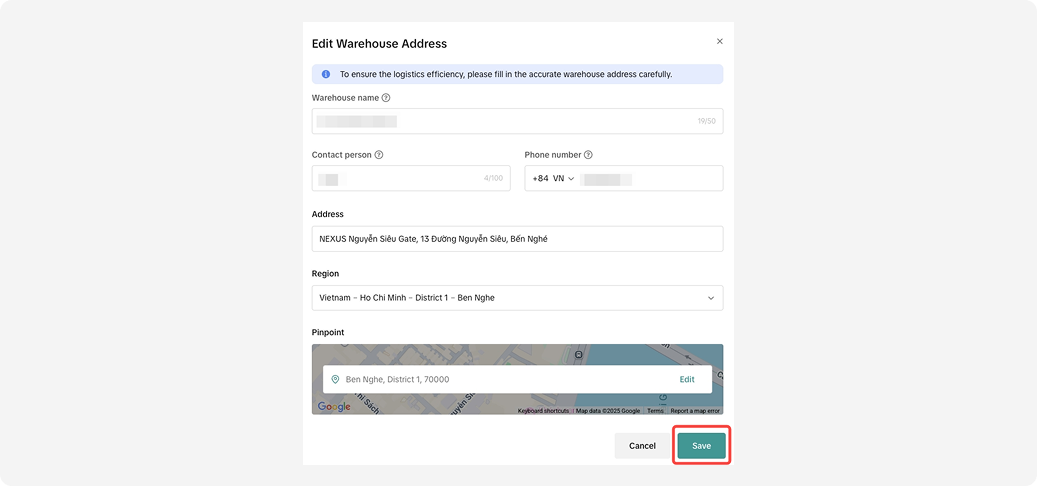
Step 1: Go toAccount Setting > Warehouse Settingto review and validate your pinpoint, as rider will use this information for picking up your packages. See below
Important: system may automatically set pinpoint for you, please click edit and review again whether the pinpoint is correct.
1.Select warehouse and click "Edit"
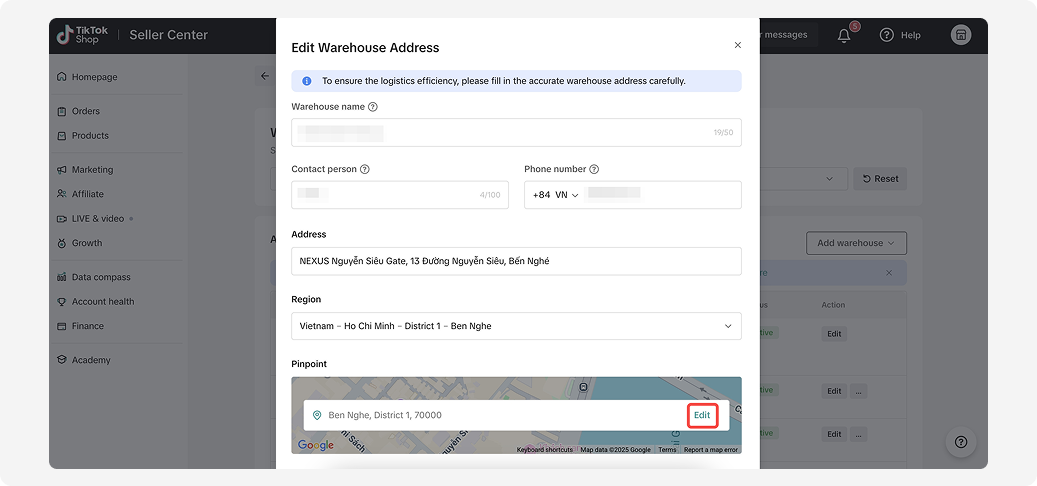
2.Go to pinpoint section and click "Edit"
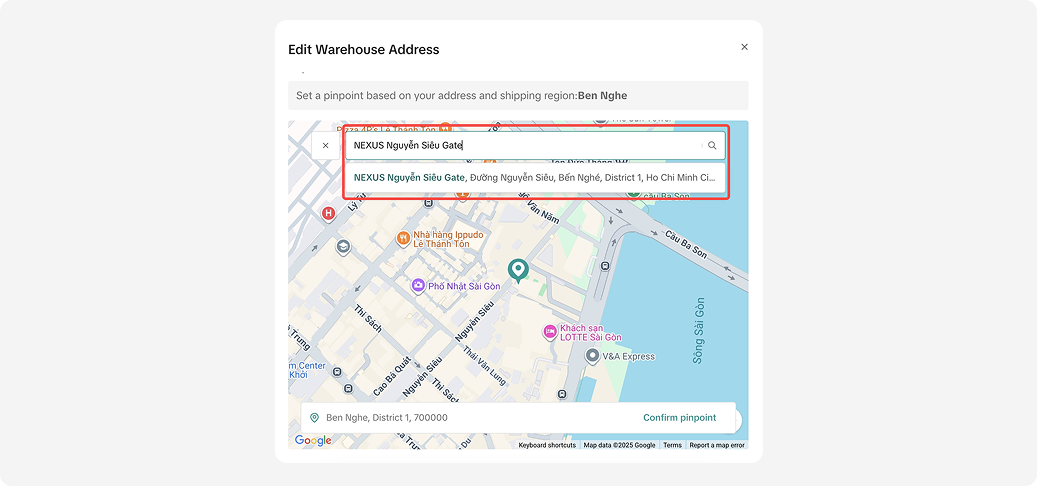
3.Input your address in the search section
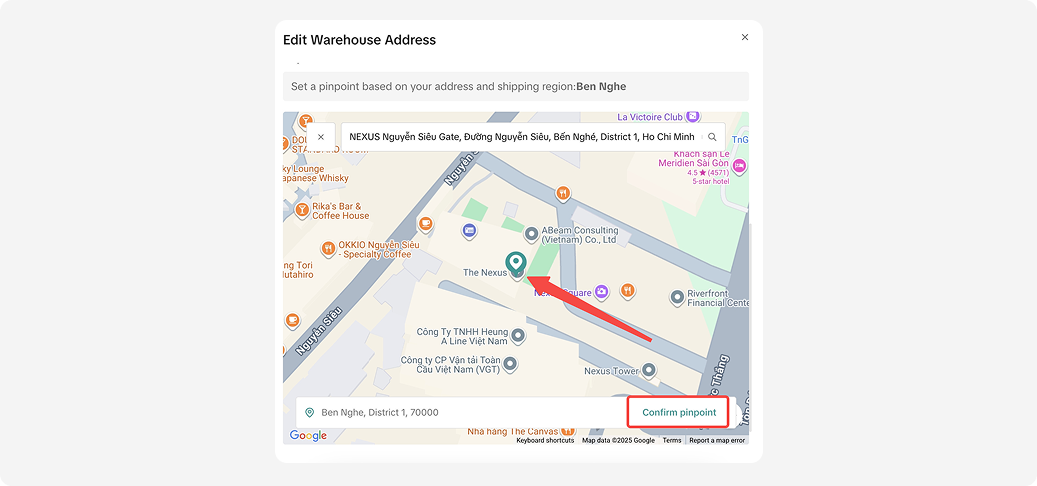
4.Zoom in map and ensure the pinpoint is correct and "Confirm pinpoint"
5.Save the adjustment of address.
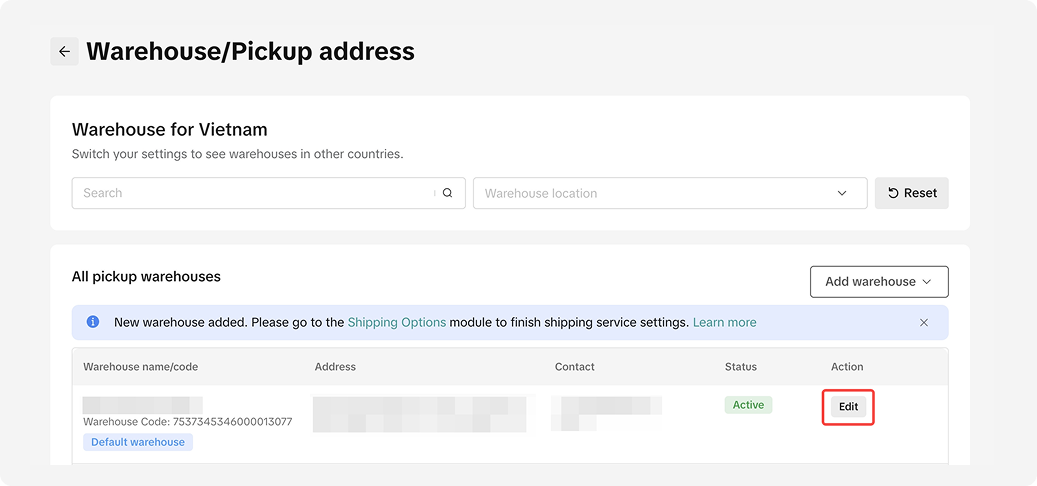
2.Go to pinpoint section and click "Edit"
3.Input your address in the search section
4.Zoom in map and ensure the pinpoint is correct and "Confirm pinpoint"
5.Save the adjustment of address.
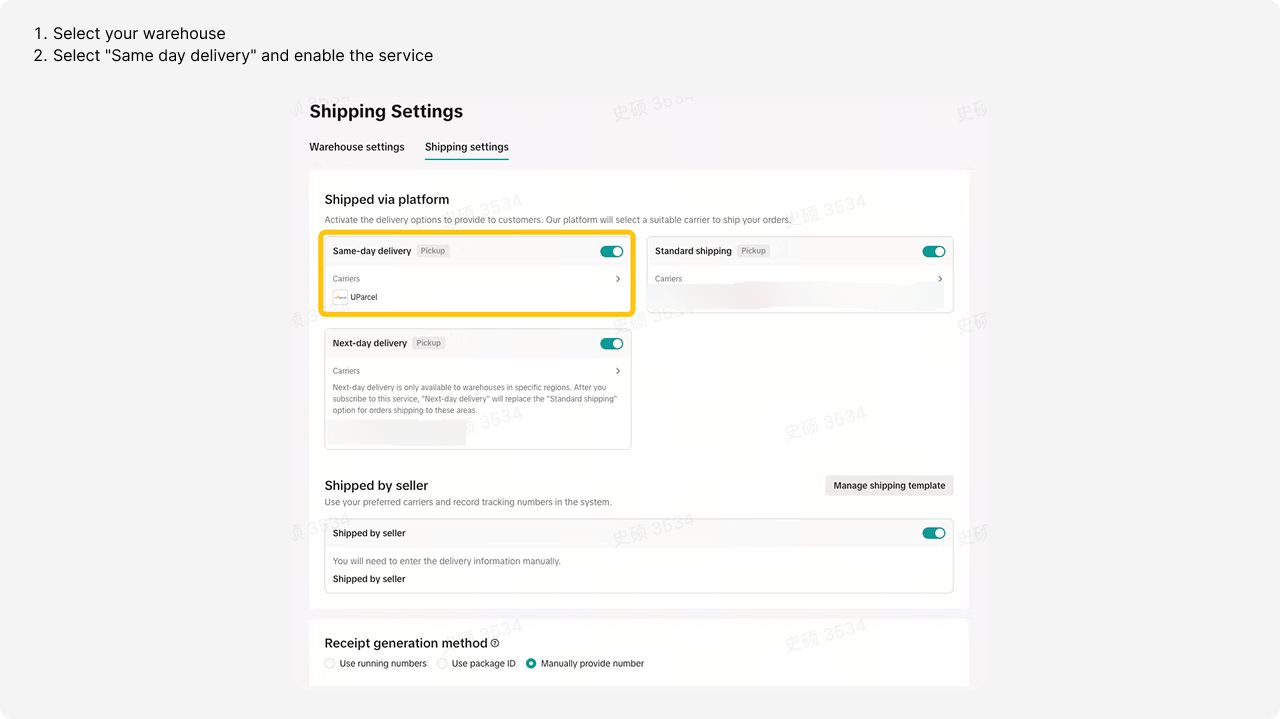
Step 2: Go to Logistics > Shipping
How to arrange & handover shipments?
You can find full information about order management inA Complete Guide to 'Shipped via Platform' article. This article will only highlight key different information.
1.Manage orders ”>> filter “Delivery options” >> filter “Same-day".
2.Print documents" >> "Shipping label
3.Arrange Shipment
4.Handover the parcel via matching Pickup Code
Important: It is strongly recommended that sellers regularly monitor their Same-day orders and fulfill them as soon as possible to ensure compliance with the SLA
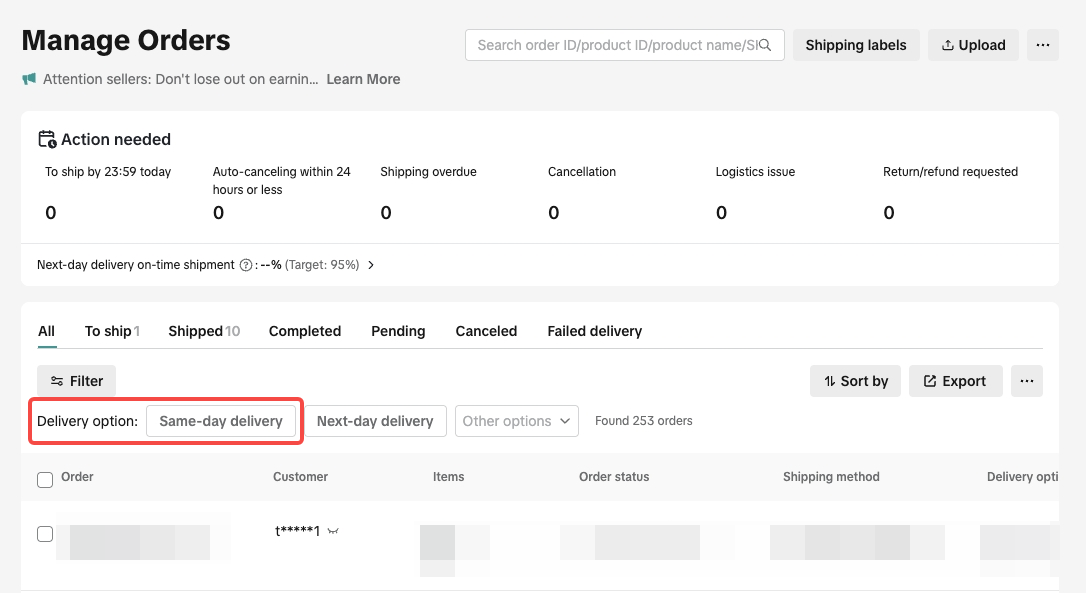
1.Manage orders ”>> filter “Delivery options” >> filter “Same-day".
Important: It is strongly recommended that sellers regularly monitor their Same-day orders and fulfill them as soon as possible to ensure compliance with the SLA
2.Print documents" >> "Shipping label
After packing, click"Arrange Shipment" to request pickup. The rider will contact you and collect the order.
Select orders you would like to fulfill and select"Print documents" >> "Shipping label".
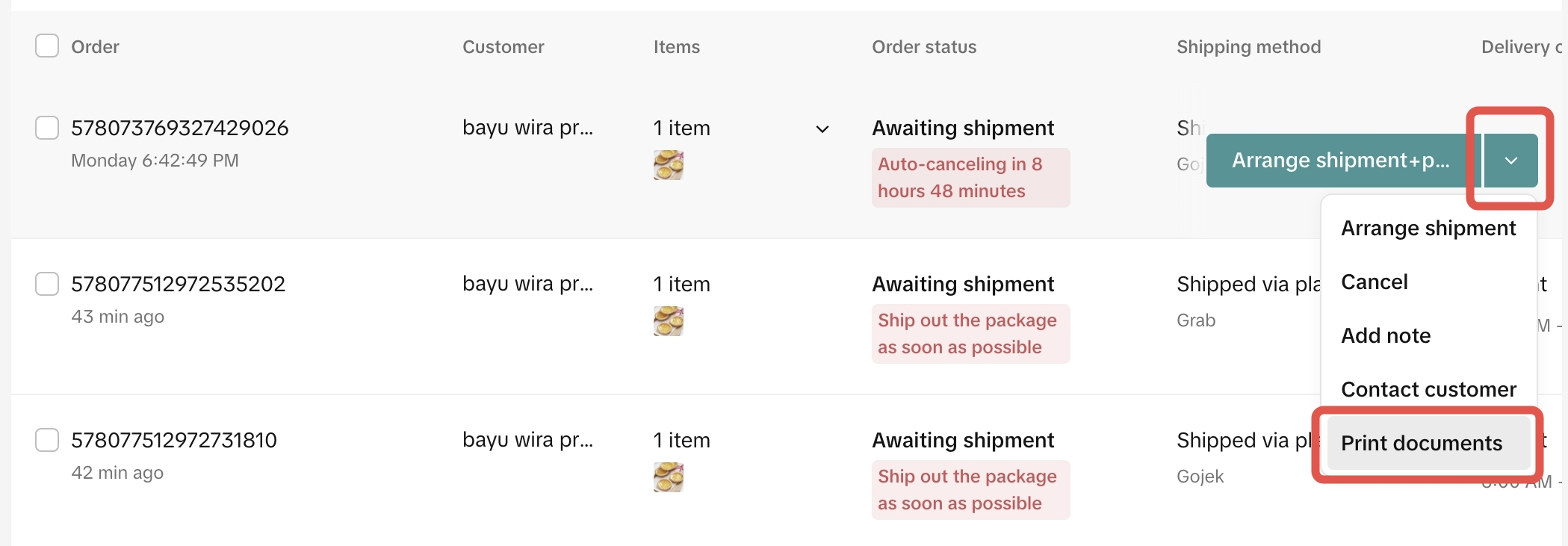
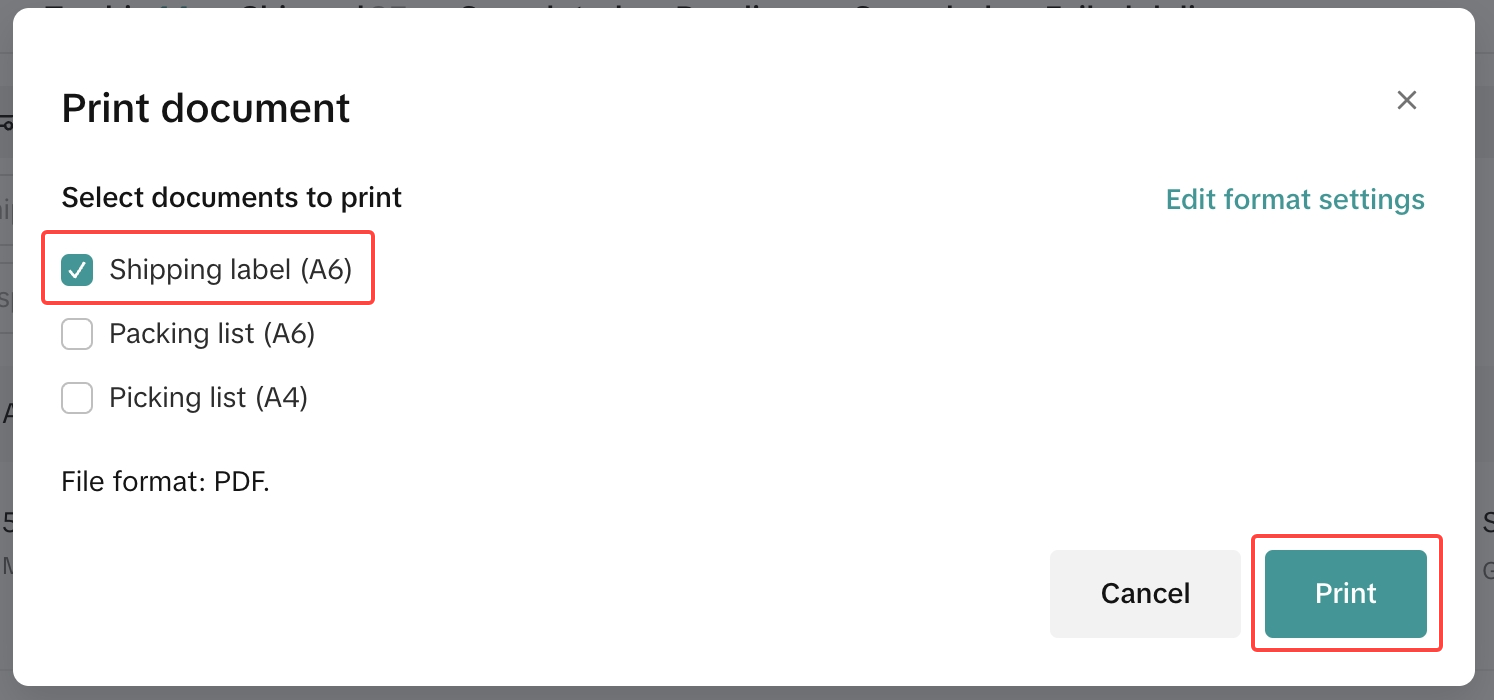
3.Arrange Shipment
Print shipping labels and pack your orders.
Note:
- Printing a shipping label will trigger a request for pickup request, and drivers will come to the seller's place after 2 PM
- If the buyer places an order before 2:00 PM, the order will need to be arranged for shipment by 2:30 PM on the same day. The platform allows RTS operations until 6 PM, facilitating sellers to handle more packages after the cut-off time for same-day delivery handover to service providers.
Outside operating hours
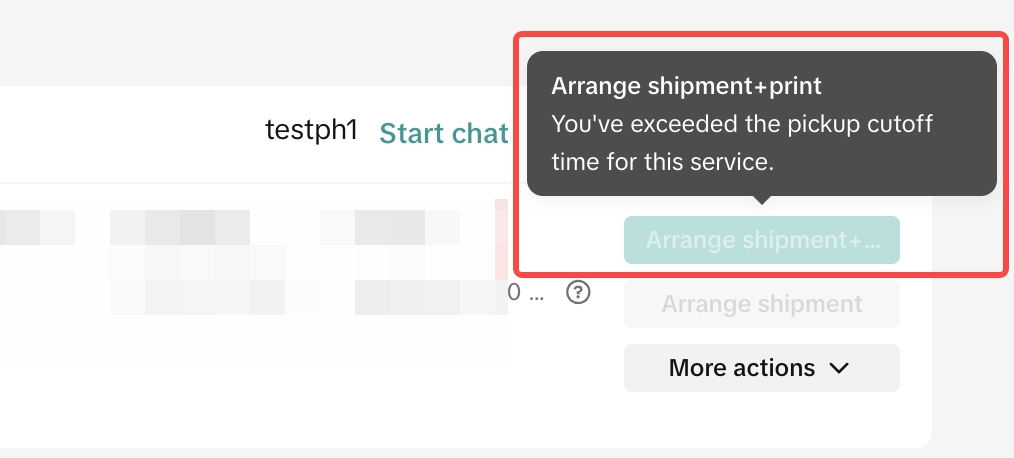
During operating hours
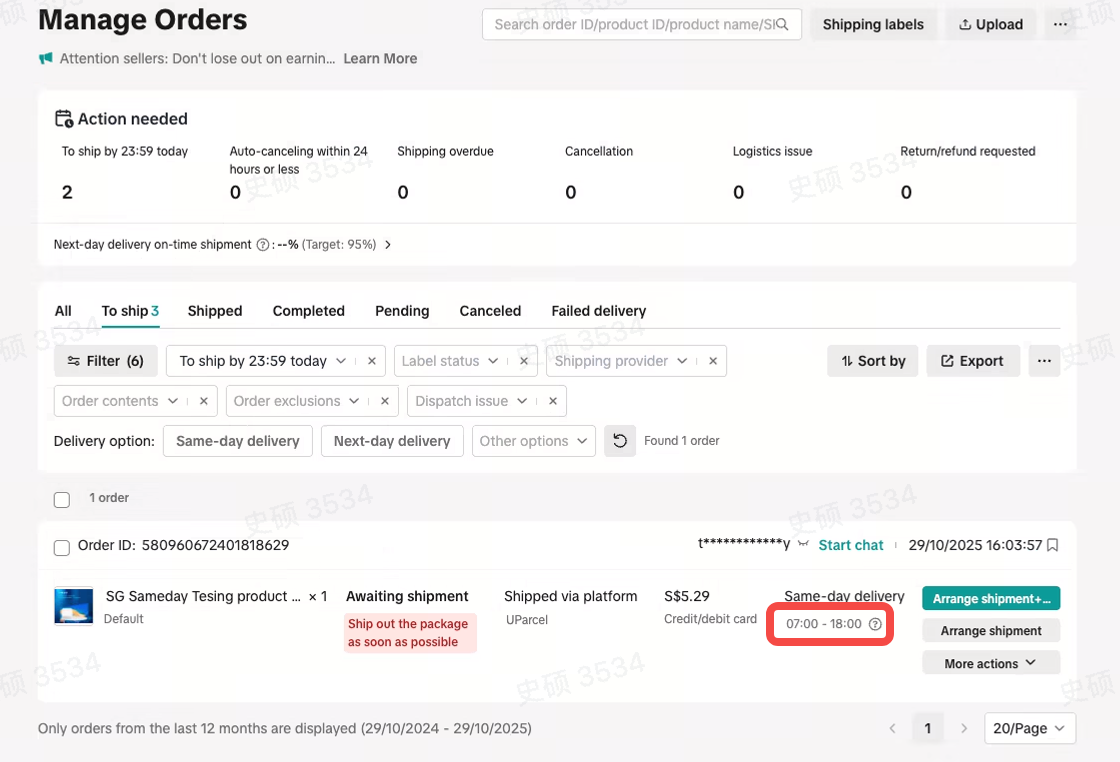
Note:
- In case of bad weather or unexpected events causing a driver shortage, our system will automatically retry to assign a driver. However, if the order isn’t picked up within the SLA period, the order may be canceled. Don’t worry! You can contact our support team for assistance. Help Center.
- You can find the driver’s contact details by clicking "View Logistics" — the driver’s name and phone number will be displayed.
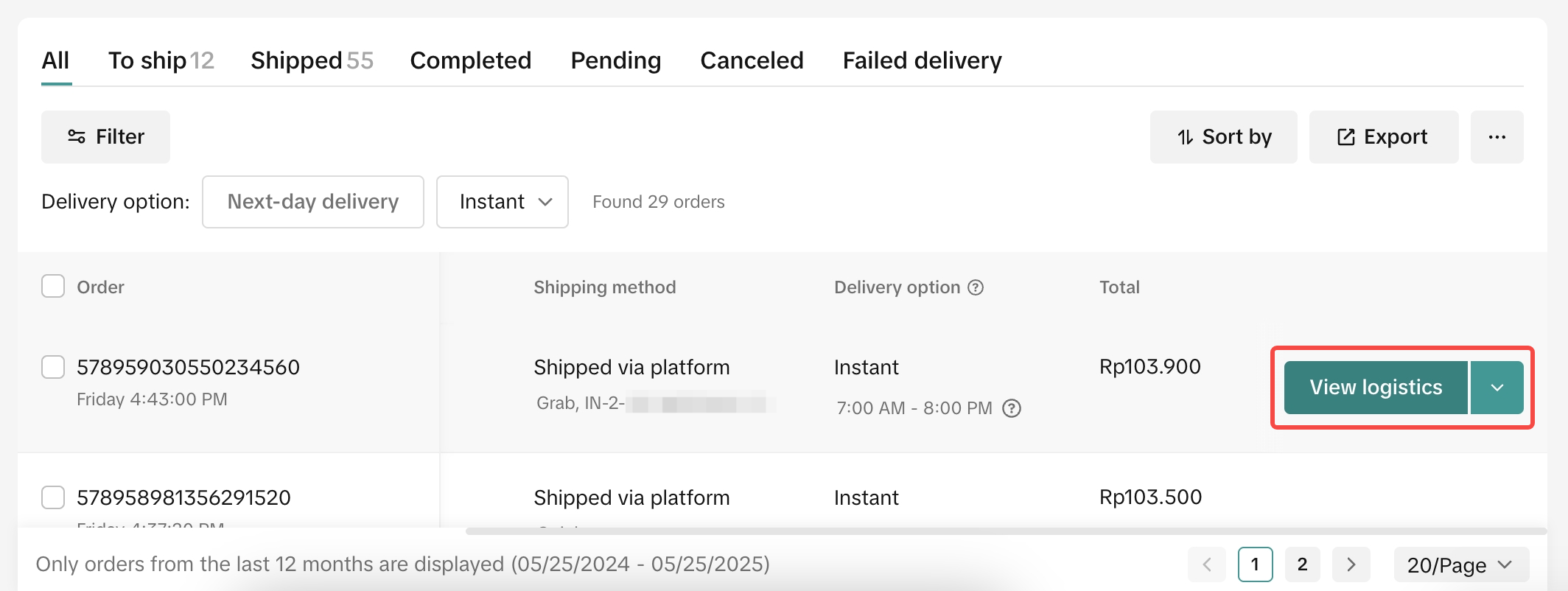
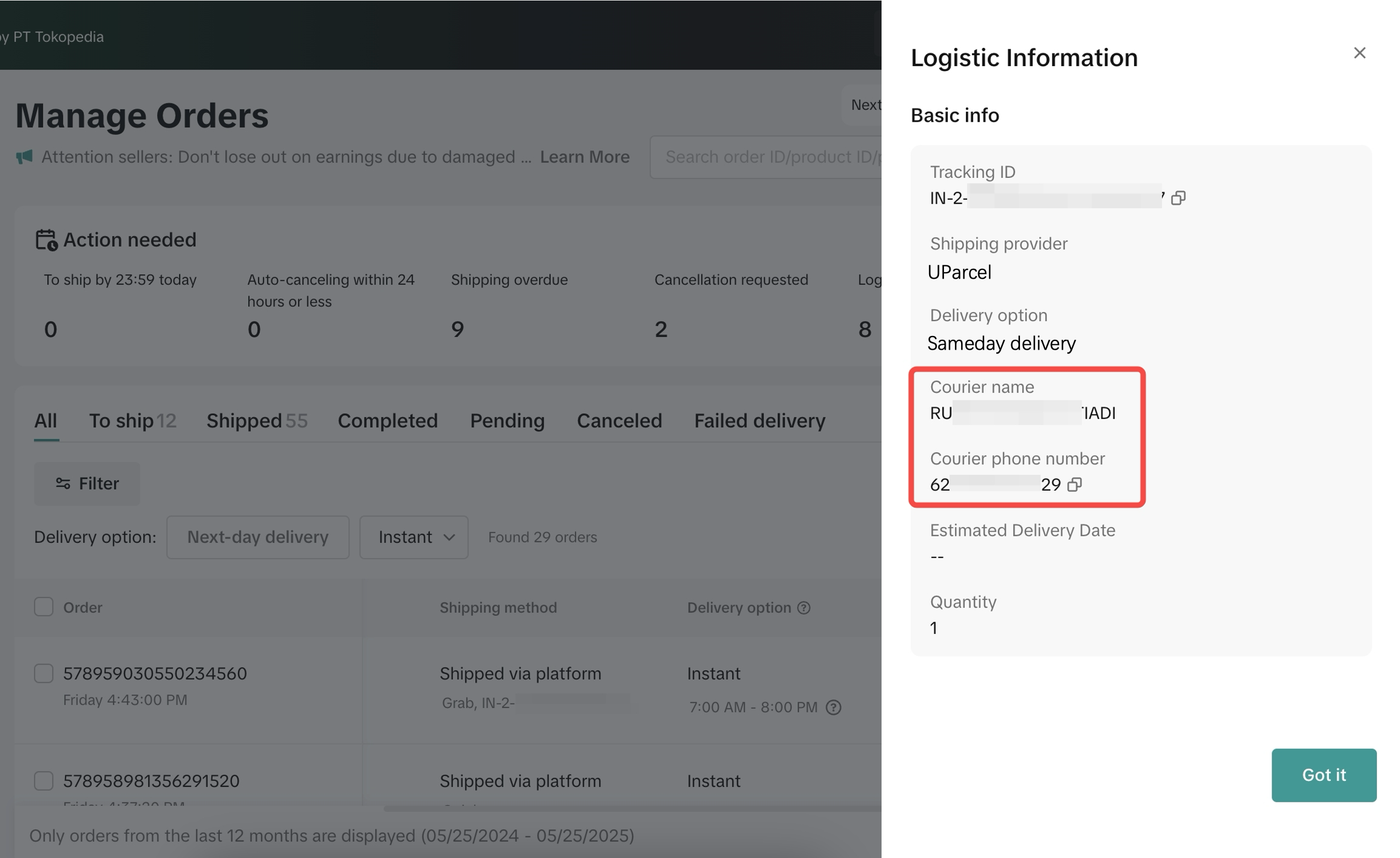
4.Handover the parcel via matching Pickup Code
To ensure the correct parcel is picked up, show and confirm the pickup code with the driver before handing over the package. The pickup code is located at the top right and as a watermark on the shipping label.
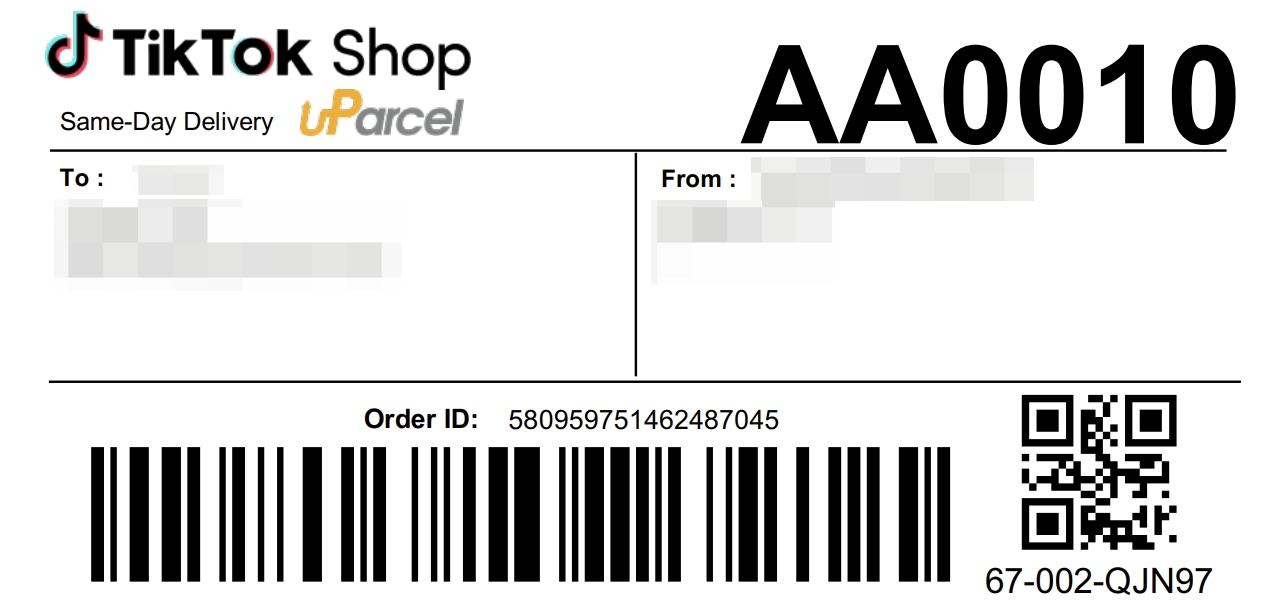
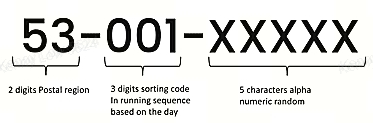
At the right bottom, there will be tracking number to assist the riders to identify the parcels faster and easier, please try to cluster them as much as possible; by same postal region (first 2 digits of tracking), followed by the running 3 digit sort code.
How to reschedule pick up?
If needed, pickup can be rescheduled once:
1. Go to order and select More action > Reschedule Pickup
2. Select a new pickup schedule
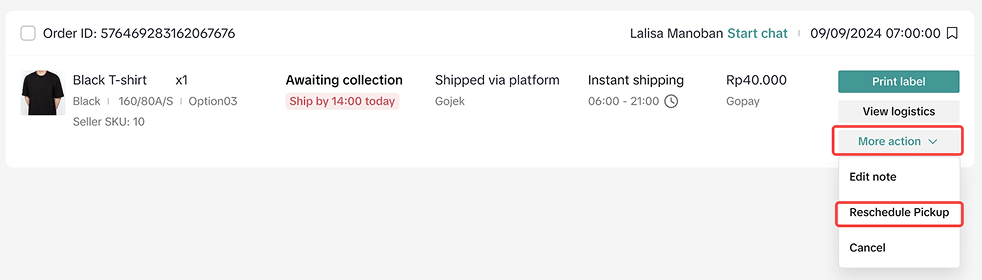
1. Go to order and select More action > Reschedule Pickup
2. Select a new pickup schedule
Select a new pickup schedule and input information of date, time, and reasons.
Important:
- The system will only allow reschedule only 1 time
- 'Reschedule day' is limited until order cancellation deadline
- 'Time' options are available only within the shipping provider's operating hours.
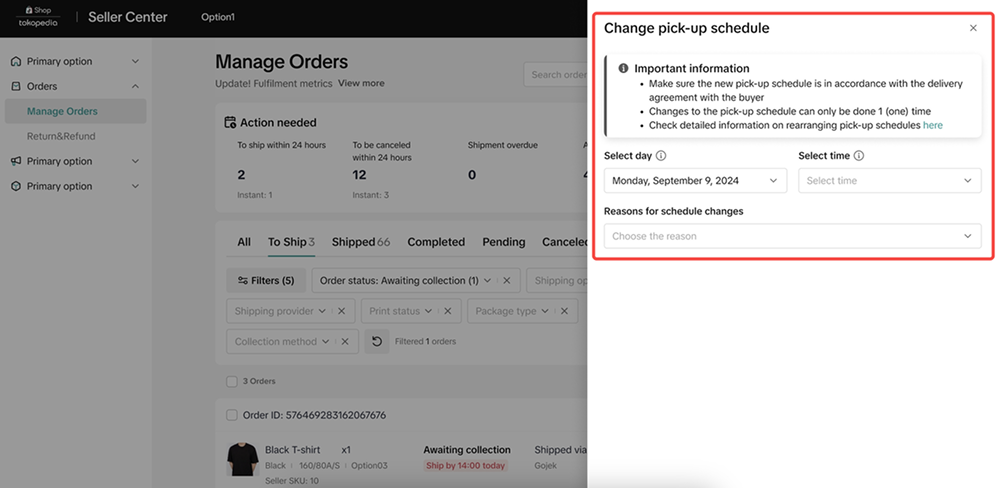
You can check your rescheduled information by More action > View Reschedule Pickup.
FAQ
What is the difference between Same Day & Standard Service?Toggle
Can I open Same Day for only some specific SKUs?Toggle
Why buyer can not see Same Day service in my shop even shop already opened Same Day service?Toggle
What if there is no rider picking up the parcels?Toggle
Can I arrange a third party transport to deliver the order to the buyer if driver is not found for long period of time?Toggle
What is the recommended method of handing over Same Day Order to the riders?Toggle
Do I have to pay any extra fee to the riders if the order failed to delivery and have to be returned?Toggle
Can I deactivate Same Day Service from my shop?Toggle
Can I reschedule pickup for orders with Same Day services?Toggle
Where can I check courier contact for Same Day services?Toggle
Why cannot I "arrange shipment"?Toggle