uParcel Scam Alert: How to Spot Fake Delivery Messages and Websites

Er Cai Fang
Senior Product Manager
uParcel Scam Alert: How to Spot Fake Delivery Messages and Websites
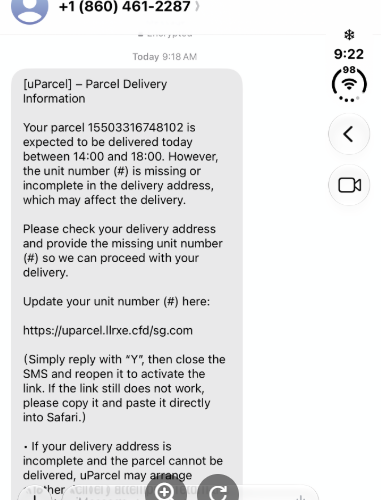
Scammers are sending unsolicited messages, often via iMessage, with links to fake websites designed to look like uParcel’s. The fake sites ask you to enter your personal particulars, bank or card details, or pay a “delivery fee” before your parcel can be released. uParcel never asks for cash or payment by SMS or WhatsApp. If you receive a message like this, don’t click the link: check your delivery through the official uParcel app or email us at express@uparcel.sg, and call the ScamShield Helpline at 1799 if you’re unsure.
The Singapore Police Force’s Scam Public Education Office alerted us to this uParcel scam on 31 October 2026 and asked us to warn our customers. This guide explains how the scam works, the warning signs to look for, and exactly what to do if you’ve already clicked or paid.
What is the fake uParcel delivery scam?
It’s a phishing scam that borrows uParcel’s name to make a fake delivery problem look real. According to the police advisory, victims receive an unexpected message about a parcel along with a link. The link leads to a fraudulent courier website that resembles the legitimate one, where victims are asked for personal information, bank or card details, or a payment before the parcel can be released.
Courier impersonation works because most people have a parcel on the way at some point. Scammers don’t need to know whether you’re expecting a delivery. They’re betting that enough people are.
How does the scam work, step by step?
Most versions follow the same pattern:
- The message arrives. You get an unsolicited text, often via iMessage, saying your parcel is on hold, couldn’t be delivered, or needs an address update.
- You’re pushed to act fast. The message may warn that your parcel will be returned or disposed of if you don’t respond quickly.
- The link opens a lookalike site. The page copies uParcel’s name and look, so it seems convincing at a glance.
- You’re asked for details or a fee. The site requests your name, address, phone number, card or bank details, or a “delivery” or “redelivery” fee.
- Your details go straight to the scammers. Anything you type in, especially card numbers and one-time passwords (OTPs), can be used for unauthorised transactions.
How can you tell if a uParcel message is fake?
If a delivery message asks you to pay or hand over financial details through a link, treat it as a scam until you’ve verified it yourself. These are the main warning signs:
|
Warning sign |
What it looks like |
|
You weren’t expecting it |
A delivery alert for a parcel you didn’t order, or that no seller told you about |
|
It asks for money to “release” your parcel |
A request for a “delivery”, “redelivery” or “release” fee before you can receive your parcel. uParcel never asks for payment by SMS or WhatsApp |
|
It asks for sensitive details |
Card number, CVV, expiry date, bank login, OTP or Singpass details |
|
It creates urgency |
Warnings that your parcel will be returned or disposed of unless you act now |
|
The web address is off |
A link that isn’t uparcel.sg, e.g. extra words, misspellings or unusual endings |
|
It arrives through an unusual channel |
An iMessage or text from an ordinary phone number or email address, instead of the official uParcel sender ID |
How do you check whether a uParcel delivery is real?
Always verify through a channel you open yourself, never through the link or phone number in the message.
- Open the uParcel app directly. Use the app already on your phone, or download it only from the official App Store or Google Play listing, and check your delivery there.
- Contact our official customer service. Email uParcel at express@uparcel.sg. Write to this address in a new email rather than replying to the message or using any contact details given in it.
- Type our web address yourself. Go to uparcel.sg by typing it into your browser, not by tapping a link.
- Check with the sender. If you’re expecting a parcel from an online seller, confirm the delivery status with them or on the marketplace where you ordered.
- Use ScamShield. The ScamShield app lets you check suspicious messages, links and numbers, and the ScamShield Helpline at 1799 is available 24/7.
What will uParcel never ask you to do?
Two rules make fake uParcel messages easy to spot:
- We never ask for cash or payment by SMS or WhatsApp. Any SMS or WhatsApp message asking you to pay a delivery, redelivery or “release” fee is not from uParcel.
- Our SMS always come from the official uParcel sender ID. A “uParcel” text that arrives from an ordinary phone number or email address, as many of these scam iMessages do, is not one of our SMS updates.
We also won’t ask for your bank login, OTP, Singpass details or full card details by message.
If someone claiming to be uParcel asks you for payment or personal details, stop and verify through our official channels first.
What should you do if you’ve already clicked the link or paid?
Act immediately. The sooner your bank knows, the better the chance of stopping further transactions.
- Call your bank right away to block your card or freeze your account. The ScamShield Helpline (1799) can connect you directly to DBS/POSB, UOB, OCBC, Citibank, Maybank, Standard Chartered and HSBC.
- Lodge a police report online at police.gov.sg or at any police station. The ScamShield Helpline cannot file a report for you.
- Report the scam message through the ScamShield app so it can help warn others.
- Change your passwords if you entered any login details on the fake site, starting with any account that shares the same password.
For urgent police assistance, dial 999.
Frequently asked questions
I got a message saying my uParcel parcel is on hold and I need to pay a fee. Is it real?
Treat it as a scam. uParcel never asks for payment by SMS or WhatsApp. Don’t click the link or pay anything. Check your delivery in the uParcel app or email us at express@uparcel.sg, and if you’re still unsure, call the ScamShield Helpline at 1799.
Does uParcel send delivery updates by SMS or iMessage?
Our SMS updates always come from the official uParcel sender ID, and we never ask for cash or payment by SMS or WhatsApp. A message that asks you to pay is not from us. One that arrives from an ordinary phone number or email address should be treated as suspicious until you’ve checked your delivery in the uParcel app.
How do I report a fake uParcel website or message?
Report it through the ScamShield app. If you’ve lost money or entered your details, also lodge a police report online at police.gov.sg. Don’t reply to the message or tap any links in it.
Who can I call if I’m not sure something is a scam?
Call the ScamShield Helpline at 1799, available 24 hours a day. If you’re overseas, call +65 6869 1799.
This advisory is based on information shared with uParcel by the Singapore Police Force’s Scam Public Education Office. For the latest scam alerts, visit scamshield.gov.sg.